Android users editing video on their phones have had plenty of options for years, just not one with Adobe's name on it. That changed this week. Adobe Premiere, the company's mobile video editor, is now available on Android, roughly a year after it first arrived on iPhone.
Adobe Premiere Comes to Android
Adobe's Android app, simply called Premiere, began rolling out on Google Play around September 22, 2026, with the release independently reported by outlets including WIRED and India Today. It's a free download, and Adobe is pitching it at people who shoot, edit and publish straight from their phones, whether that's a daily vlog, a YouTube Short, a podcast clip or a quick product demo for a small business.
Worth noting: Google Play's own listing describes the release as early access. That's a small but meaningful detail. It suggests Adobe is still refining the app based on real-world use rather than treating this as a finished, locked-down product, which is fairly normal for a first mobile release but worth keeping in mind if you're planning to build a production workflow around it right away.
4K Video Editing Explained
The headline feature is 4K support, and Adobe isn't gating it behind a paywall. Users can edit and export video at resolutions up to 4K, with unlimited exports and no watermark, for free. The app also lets you pick different output sizes depending on where the video is headed, useful if you're cutting the same footage into a square Instagram post and a vertical YouTube Short from the same timeline. Adobe hasn't published a detailed breakdown of every supported frame rate or codec for the Android release in its public materials, so treat the format-level specifics as still emerging rather than fully documented.
Advanced AI Features
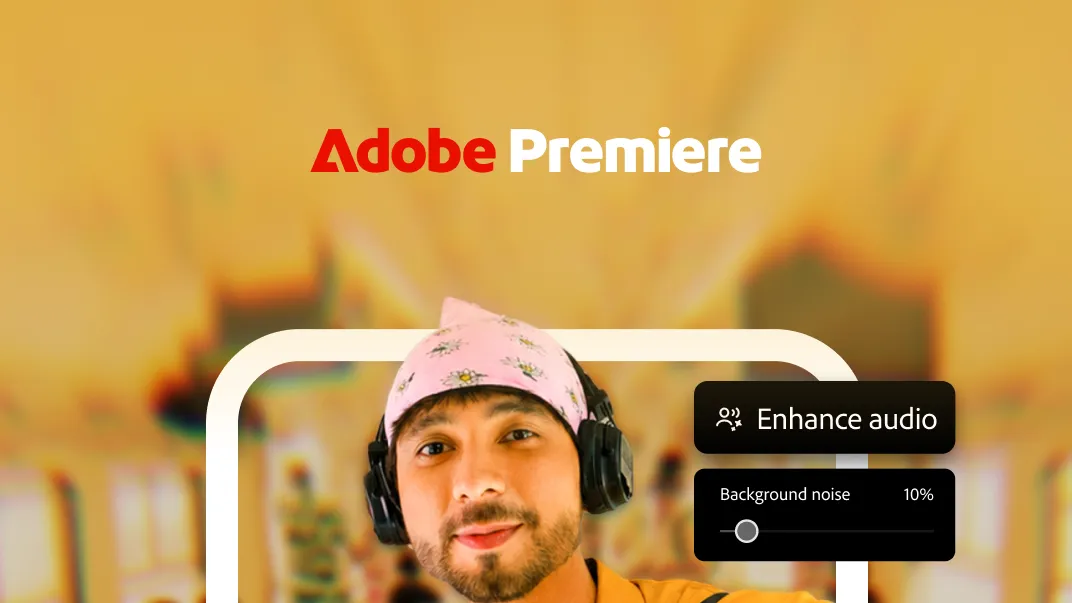
Premiere's AI tools run on Adobe's Firefly models, and they're where the app starts charging. Generative Fill, Image-to-Video and Generate Sound Effects are all available, letting users create supplementary visuals or audio from text prompts rather than sourcing everything themselves. These features draw on generative credits, which are an in-app purchase rather than something included in the free tier. Separately, an Enhance Audio tool uses AI to clean up background noise and sharpen dialogue in interviews or voiceovers, a genuinely practical feature for anyone recording on a phone mic in an imperfect room.
Key Editing Tools and Features
Away from AI, the core toolkit covers a lot of ground for a free app. You can split, trim, crop and merge clips, adjust playback speed, and build projects across a multi-track timeline with layered video, audio and text. Voiceover recording is built in, along with effects, transitions and creator-made templates for people who want a head start rather than a blank canvas. Captions are supported too, though Adobe says an enhanced captions experience is still coming, alongside Adobe Fonts and tighter continuity with desktop Premiere projects, so a few pieces of the toolkit are explicitly on the way rather than in your hands today.
Supported Devices and Performance
Premiere on Android isn't built to run on anything with a Google Play listing. Adobe requires Android 13 or later and at least 5GB of RAM, which rules out a meaningful chunk of older or budget hardware. That's a reasonable trade-off given what the app is asking a phone to do: decode and render 4K timelines while also handling AI processing for some of its generative features, which appears to lean on cloud services rather than running entirely on-device. Adobe hasn't published independent battery-life or thermal data for the Android version, so how it behaves during a long editing session on a mid-range phone is still an open question.
Pricing and Availability
The core app costs nothing. Adobe makes money on the optional extras: generative AI credits for the Firefly-powered tools, and additional cloud storage beyond whatever comes free. Adobe hasn't published specific dollar figures for credit bundles or storage tiers in the materials reviewed for this article, so anyone curious about the exact cost of going beyond the free tier will need to check pricing directly inside the app.
Premiere Android vs Desktop Premiere Pro
It's worth being clear about what this app is and isn't. Premiere on Android is not a pocket version of Premiere Pro. It's a simplified, mobile-first editor aimed at people who want solid tools without a learning curve, not a replacement for a full desktop timeline with the depth of color grading, plugins and precision editing Premiere Pro offers. Adobe has said tighter continuity between the mobile app and desktop projects is coming, which implies that link isn't fully built yet. The app also effectively supersedes Premiere Rush, Adobe's older simplified mobile and cross-platform editor, which is approaching the end of its support window.
Impact on Mobile Creators
For casual creators, students and social-media-first users, this fills a real gap: a free, capable, watermark-free 4K editor from a brand many already trust, without needing a subscription just to get started. Adobe has pointed to India as an example of why this matters, saying 95% of content creators there work primarily from smartphones rather than desktops. For working YouTubers and professional editors, though, the calculus is different. The absence of full desktop-project continuity at launch means Premiere Pro likely remains the tool of record for anything beyond quick turnarounds or mobile-first content.
Expert and Adobe Views
Adobe has framed the app as a way to bring professional-style editing to mobile without forcing people to move footage to a computer first. Outside commentary has been a bit more pointed about the business question underneath that pitch: whether a genuinely useful free tier converts casual users into paying customers for AI credits and storage, or whether most people simply use the free tools and never look back. That's a fair open question, and it's independent analysis rather than anything Adobe itself has said publicly.
Conclusion
Premiere's Android debut gives a large, previously excluded group of users access to a free, watermark-free 4K editor with a genuinely useful set of AI tools layered on top for anyone willing to pay for credits. It's not trying to replace Premiere Pro, and Adobe's own "early access" label on the Play Store is a fair signal that some rough edges and missing pieces, like deeper desktop continuity, are still being worked out. For now, it's a solid, free option for mobile-first creators, with a few notable gaps still to be filled in.
Further reading and useful links
Reader questions
Frequently asked questions
Is Adobe Premiere available on Android?
Yes, Adobe Premiere has launched on Android as an early access release on Google Play, roughly a year after its iPhone debut.
Is 4K video editing free on the Android app?
Yes, users can edit and export videos at resolutions up to 4K for free, with unlimited exports and no watermark.
What AI features are included in Adobe Premiere for Android?
The app includes Firefly-powered AI tools such as Generative Fill, Image-to-Video, Generate Sound Effects (available via generative credits), and an Enhance Audio tool to clean up background noise.
What are the system requirements to run Adobe Premiere on Android?
The app requires Android 13 or later and at least 5GB of RAM.
Nexuswild welcomes factual corrections. Email [email protected] with evidence and the article URL.