
An open-source image editor called PhotoCraft is gaining attention for its attempt to recreate the familiar workflow of Adobe Photoshop while offering users a free alternative.
Developed by the ArtCraft team, the application is written in Rust and combines a Photoshop-inspired interface with support for layered documents, masks, brushes and image-editing effects.
The project is designed to help users familiar with Photoshop move to an alternative without having to learn an entirely different interface. Its developers describe it as a clean-room reimplementation, meaning the software is intended to be developed independently using publicly available specifications and observations of existing behaviour rather than copying Adobe's proprietary source code.
PhotoCraft remains in early alpha, however, and its current capabilities should not be confused with a complete replacement for Photoshop in professional workflows.
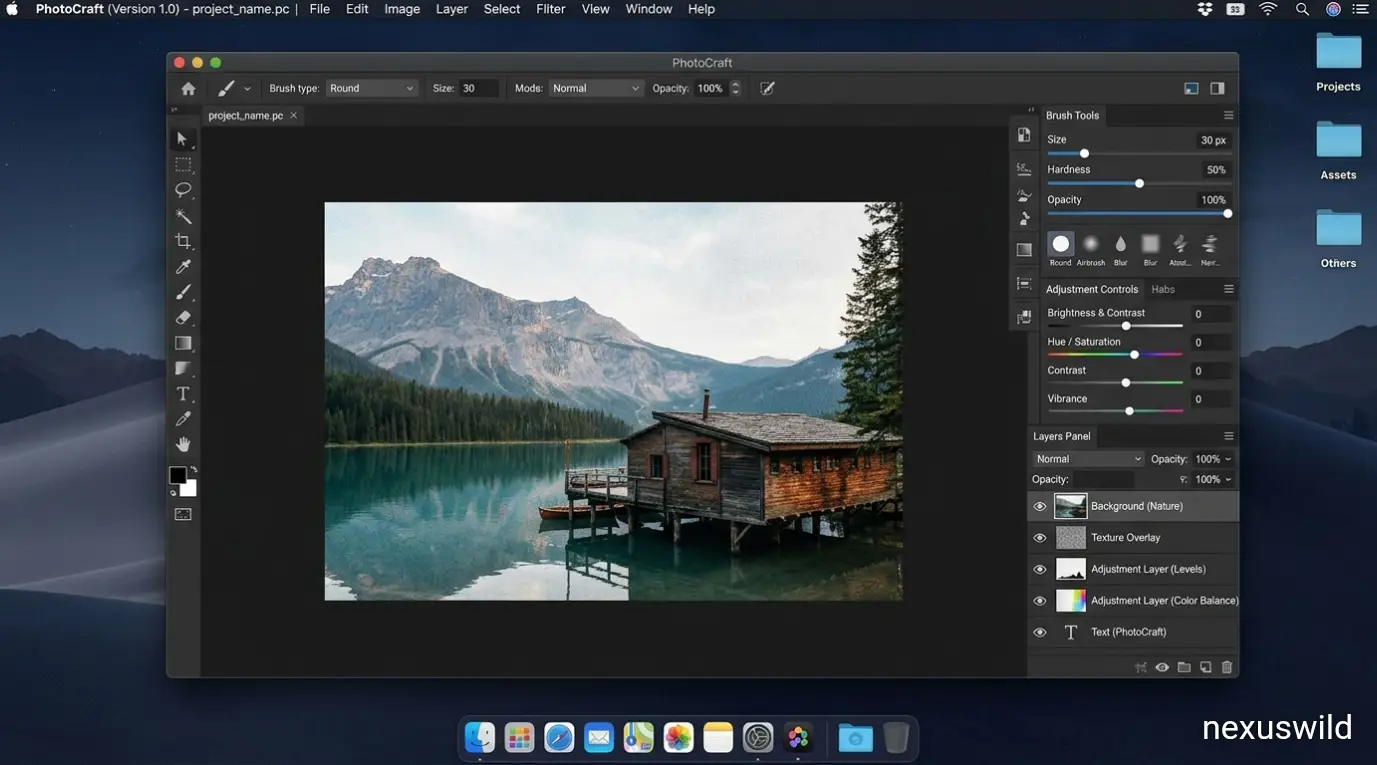
A familiar interface with open-source development One of PhotoCraft's main attractions is its emphasis on familiarity. Menus, keyboard shortcuts, tools and panels are arranged to resemble the workflow many Photoshop users already know.
This approach could reduce the learning curve for designers, photographers and other creative professionals who want to experiment with an alternative but are reluctant to abandon established editing habits.
According to the project's official GitHub repository, PhotoCraft supports layers, masks, adjustment layers, layer styles, typography, vector elements and brushes. It can also open, edit and save documents in Adobe's PSD format, which is widely used to preserve image layers and other editable elements.
PSD compatibility is particularly important for users who collaborate with designers or maintain existing project files. Rather than flattening every image into a single layer, an editor that supports layered documents can preserve much of the structure needed for further editing.
Nevertheless, compatibility does not automatically guarantee identical results. Differences in effects, fonts, rendering and other features can affect how a document appears when opened in different applications.
Built with Rust and GPU acceleration PhotoCraft is written in Rust, a programming language known for its emphasis on memory safety and performance. The project also uses a graphics architecture designed to support GPU-accelerated rendering.
Its documented graphics stack uses wgpu, which supports graphics backends including Vulkan, Metal and DirectX 12, depending on the operating system and environment.
The project also emphasises native application performance rather than relying on an Electron-based desktop interface. Its developers describe an architecture built around image-processing operations, tiled image data and multithreaded filters.
These technical choices could help the application handle demanding editing tasks efficiently. Actual performance, however, will depend on hardware, image dimensions, layer counts and the complexity of the effects being applied. Users should therefore assess performance with their own workloads rather than assuming that a familiar interface or modern programming language guarantees better results.
AI-assisted development is drawing attention
PhotoCraft's emergence also highlights a broader development in software engineering: AI-assisted coding tools are making it easier to build complex application prototypes and expand their feature sets rapidly.
The project has attracted attention partly because of the apparent speed of its development. Its public repository provides a view of ongoing contributions, releases and changes as developers work towards broader feature coverage.
However, the presence of AI-assisted development does not establish that an application is fully autonomous, entirely AI-generated or production-ready. Those are separate claims that require evidence.
The more important question is whether the software can consistently deliver the results users need.
PhotoCraft also includes an agent-oriented architecture. Its documentation describes application actions that can be exposed through interfaces such as the command line and a JSON control channel, making it possible for external tools and AI agents to interact with editing operations.
This could create opportunities for automated image-processing workflows, although the usefulness of those capabilities will depend on implementation quality, permissions and the reliability of individual operations.
Why PhotoCraft is not yet a Photoshop replacement Despite its growing feature set, PhotoCraft has significant limitations. The project's documentation explicitly identifies it as early-alpha software and acknowledges that it is not yet a full replacement for Photoshop in daily professional work.
This distinction matters because professional image editing involves much more than placing tools in familiar locations. Users depend on consistent colour handling, precise selections, predictable blending modes, typography controls, specialised retouching features and reliable behaviour across complex documents.
An alternative may offer a similarly named tool without reproducing the exact behaviour or output of its established counterpart.
Professional users must also consider missing functionality, bugs, third-party plugin compatibility and the consequences of moving existing projects between applications. A seemingly minor difference can become a serious obstacle when repeated across a production workflow.
For casual users, hobbyists and developers, these limitations may be acceptable. PhotoCraft could provide a useful environment for basic edits, experimentation and exploring open-source creative software.
For photographers, agencies and designers working under client deadlines, testing the application against real projects before adopting it more widely would be a sensible approach. Availability and what users should know PhotoCraft's source code and development information are available through its official GitHub repository.
The project documents ways to build and run the application, while platform-specific packages are associated with its release process.
Users should consult the repository's current release information before downloading the software because supported platforms, installation options and features can change as development continues.
Although the core application is open source, users should distinguish that from any separately offered services or paid features associated with the wider ArtCraft ecosystem. The exact terms should be checked on the relevant official pages.
The application is not affiliated with or endorsed by Adobe simply because it aims to support familiar Photoshop workflows.
What comes next for PhotoCraft? PhotoCraft's future will depend on whether its developers can turn rapid development into dependable editing tools. Expanding feature coverage is only one part of that challenge; matching expected behaviour, improving stability and handling complicated documents are equally important.
For the open-source community, the project offers another example of how independent developers are challenging established software through alternative implementations and modern development techniques.
For users, the practical test is straightforward: whether PhotoCraft can perform the required tasks accurately, preserve existing files and fit into an everyday creative workflow.
Until those capabilities mature, PhotoCraft is best viewed as a promising experimental alternative rather than a direct replacement for professional image-editing software.
Nexuswild welcomes factual corrections. Email contact@nexuswild.com with evidence and the article URL.